
Affordable Google Ads Management for Small Trades – 2026 Guide
Running a trade business on a tight budget means every dollar counts. You can’t waste money on ads that don’t bring jobs. In this guide we break down how to get affordable google ads management for small trades that actually works. You’ll learn how to pick the right niche, set up a lean campaign, tune bids, track results and grow without blowing your cash.
Below is the data we used to compare the two low‑cost agencies we could find. It shows how few promise a free audit or a lead guarantee.
| Name | Unique Differentiator | Best For | Source |
|---|---|---|---|
| Google Ads Management for Tradies (Our Pick) | Managed by the founders, not outsourced to juniors | Best for founder‑led service | theagencyalternative.com |
| Tradesman digital marketing | focuses on lead generation for our clients | Best for lead‑generation focus | youtube.com |
Step 1: Define Your Trade Niche & Target Keywords
Before you spend a cent, you must know exactly who you’re trying to reach. A plumber in Brisbane will rank for different terms than an electrician in Perth. That’s why we start with a narrow niche and a tight keyword list.
First, write down the top three services you offer. Think about the jobs that bring the most profit. For example, an HVAC tech might list “emergency AC repair”, “annual maintenance contract” and “new system install”. Then ask yourself: who looks for these services online? What words do they type?
Next, use a keyword tool to turn those service ideas into search terms. Keywordme plugs right into the Google Ads UI and lets you pull search‑term data without leaving the account. It helps you spot high‑intent phrases and prune out low‑value terms. You can also start with the free Google Keyword Planner to get volume and CPC estimates. The planner shows you the “top of page bid” range , a good proxy for how competitive a term is.
When you pull a list, filter for three‑plus word phrases. Long‑tail keywords cost less and attract people ready to hire. Examples for a plumber might be “24‑hour blocked drain service Brisbane” or “licensed gas fitting near me”. For each phrase, note the estimated CPC and the search volume. Aim for terms with CPC under $5 and at least a few dozen searches per month.
Now build a simple spreadsheet. Column A holds the keyword. Column B holds the CPC estimate. Column C holds a quick rating of intent , low, medium, high. Mark the high‑intent rows in green. Those are the ones you’ll add to your first campaign.
Pro tip: run the “start with a website” feature in Keyword Planner. Paste a competitor’s URL and the tool will suggest the keywords Google thinks are linked to that site. You can steal the high‑intent terms and drop the low‑value ones.
Don’t forget negative keywords. Add words like “DIY”, “free”, “jobs” and “training”. They keep tyre‑kickers from eating your budget.
Here are three quick actions you can take right now:
- Write down your top three profit‑driving services.
- Use Keywordme or Google Keyword Planner to pull 15‑20 long‑tail keywords.
- Create a negative keyword list with “free”, “DIY”, “jobs”.
Once you have a clean list, you’re ready to build a campaign that only shows for the searches that matter.
Step 2: Set Up Cost‑Effective Campaign Structure
With your keyword list in hand, the next move is to design a lean campaign layout. A tidy structure saves time, cuts waste and makes optimisation easier.
Start with a single Search campaign. Inside that, create one ad group per service. If you sell “emergency drain clearing” and “weekly maintenance”, give each its own ad group. Keep the ad group tight , 5 to 8 keywords max. This lets Google see a clear match between the search term and the ad copy, which lifts Quality Score.
Use exact match brackets for your core keywords. That tells Google to only show your ad when the search phrase matches exactly. For broader reach, add a phrase‑match version of the same term. Avoid broad match , it can drain a low budget fast.
Write ad copy that mirrors the keyword. If the keyword is “24‑hour blocked drain service Brisbane”, include “24‑hour blocked drain” in the headline and “Brisbane” in the description. Add a clear call‑to‑action like “Call now for a free quote”.
Now set a daily budget that fits your cash flow. For most small trades, $20‑$30 per day is a realistic start. Google will smooth spend over the month, but you may see spikes on busy days. That’s normal.
Below is a quick checklist you can copy into a Google Sheet to audit your setup.
| Item | Done? | Notes |
|---|---|---|
| One Search campaign only | — | Keep budget focused |
| Ad groups by service | — | 5‑8 keywords each |
| Exact match keywords | — | Protect budget |
| Phrase match backup | — | Extra reach |
| Negative keyword list | — | Block tyre‑kickers |
| Ad copy mirrors keyword | — | Higher Quality Score |
Watch this short video for a visual walk‑through of setting up ad groups and budgets.
When you launch, keep an eye on the “Search partners” setting. By default Google turns it on, but for a low budget it adds low‑quality clicks. Turn it off in the campaign settings.
Another tip: pause any Display or Video placements until you have at least 30 conversions. Those networks need more data to be cost‑effective.
Here are three actions you can do after the first week:
- Check the “Search terms” report. Move any irrelevant terms to the negative list.
- Look at Quality Score. If any ad group is below 6, rewrite the ad copy.
- Review daily spend. If you hit the budget early, lower the max CPC on high‑cost keywords.
By keeping the structure tight, you make the next steps , bid tweaks and tracking , much simpler.
Read more about low‑budget tactics on Exxa Digital’s guide. It explains why precision beats volume when you only have $20 a day.
For a quick visual on what not to do, watch the YouTube walkthrough on low‑budget pitfalls.
Step 3: Optimize Bids & Budget for Small Trades
Now that your campaign is live, the next job is to fine‑tune bids. This is where the magic of affordable google ads management for small trades happens.Google offers several bid strategies. For a brand‑new, low‑budget account, start with Manual CPC. It gives you full control over each keyword’s max cost‑per‑click. Set a cap that matches your CPC estimate from the keyword planner , usually $2‑$4 for local services.
If you see a keyword consistently delivering cheap clicks and conversions, raise its max CPC by $0.20. If a keyword is costing $6 and not converting, lower it or pause it. This manual approach avoids the data‑hungry automated strategies that need many conversions to work.
After you have at least 10‑15 conversions, you can test a Smart Bidding option. “Maximize Clicks” is a simple automated rule that tries to get the most clicks within your daily budget. It works well when you only care about traffic volume.
If your goal is leads, try “Target CPA” (cost per acquisition). Set a target cost‑per‑lead (CPL) that matches what you can afford , say $30 for a plumbing job that nets $200 profit. Google will then bid higher on the searches that are more likely to turn into leads.
Remember to cap the max CPC even with automated bidding. This stops the algorithm from overspending on a single day.
Another lever is ad schedule. Look at the time‑of‑day report. If most calls happen between 8 am and 6 pm, set your ads to run only during those hours. This saves money on night‑time clicks that rarely convert.
Geotargeting is also key. Use “Presence: People in or regularly in your targeted locations” to avoid showing ads to people far away. A local electrician should only bid for suburbs they can serve within an hour’s drive.
Here are three quick steps to adjust bids after two weeks of data:
- Open the “Keywords” tab and sort by “Cost / conv”.
- Raise max CPC on the top 3 performers by 10%.
- Lower or pause keywords with cost / conv above your target CPL.
Read the official guide on bid strategies at Google Support. It explains each option in plain language.
For budget‑stretching tips, see Google’s budget article. It shows how to let the platform smooth daily spend and why you shouldn’t tweak the daily limit too often.
Step 4: Track Results & Scale Smartly
Tracking is the bridge between spend and profit. If you can’t see which clicks turn into jobs, you’ll keep guessing.
First, set up conversion tracking. Add the Google Ads tag to your thank‑you page or use call‑only extensions with call‑tracking numbers. This tells Google which clicks are worth paying for.
Next, link your Google Ads account to Google Analytics. In Analytics, enable “Goals” that match a form submission, a phone click or a booking request. When you look at the “Acquisition > Google Ads > Campaigns” report, you’ll see both clicks and conversions side by side.
Use the data to calculate your true cost per lead (CPL). Divide the amount spent by the number of leads recorded. Compare that CPL to the profit you earn per job. If the CPL is higher than the profit, you need to cut costs or raise prices.
When you have a stable CPL under your target, consider scaling. The safest way is to increase the daily budget by 10‑20% and watch the performance for a week. If the CPL stays steady, you can repeat the bump.
Another scaling tactic is to add new ad groups for related services. For a plumber, you might add “water heater installation” once the core emergency service is profitable. Keep the same tight keyword‑to‑ad matching rule.
Don’t forget to revisit your negative keyword list. As you add new services, new irrelevant searches may appear. Adding them to the list protects your budget.
Here’s a simple weekly audit checklist:
- Check conversions vs spend. CPL should be under target.
- Review Search Terms report. Add any new irrelevant terms to negatives.
- Inspect ad copy performance. Pause ads with low click‑through rates.
- Look at device report. If mobile converts better, raise mobile bids.
When the numbers look good, you can test a Performance Max campaign , but only after you have at least 30 conversions per month. Until then, stay with Search‑only campaigns.
Our own approach at The Agency Alternative follows this exact loop. We audit, set up, track and then scale only when the data shows a clear profit path.
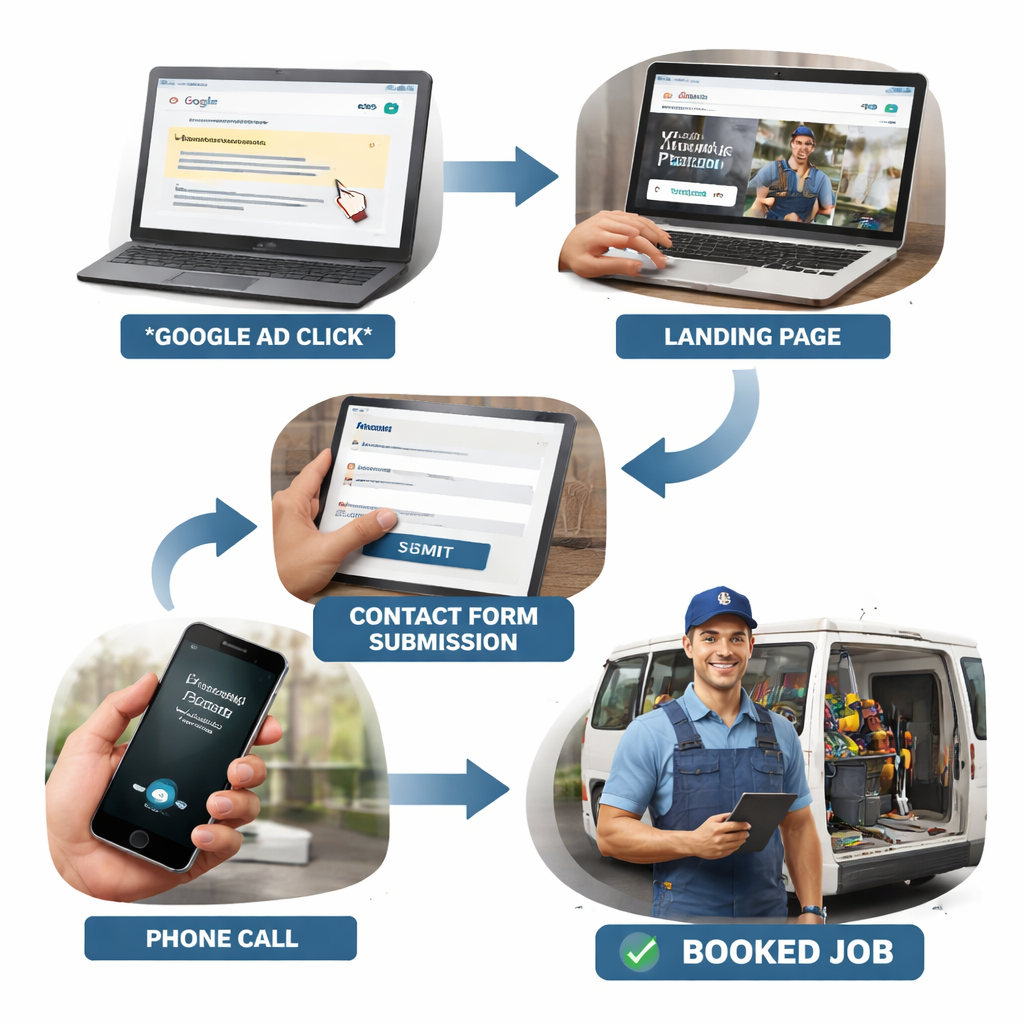
Below is a quick visual of a conversion funnel for a tradie:
FAQ
What budget should a small trade start with for affordable google ads management for small trades?
We recommend a daily spend of $20‑$30, which works out to about $600‑$900 a month. This level gives you enough clicks to collect data while keeping risk low. If you can stretch to $40 a day, you’ll see faster results, but never go above what you can afford to lose while you are still testing.
How long does it take to see the first leads?
Most tradies see their first qualified leads within 7‑14 days if the keywords are well‑chosen and the ad copy matches intent. The key is to launch with a tight set of long‑tail terms and a solid negative list. Early data helps the algorithm learn faster.
Do I need a separate landing page for each service?
Yes. A dedicated landing page improves relevance and boosts Quality Score. When the page title, headline and copy echo the keyword, Google rewards you with lower CPC. It also helps the visitor feel they are in the right place, which raises conversion chances.
Can I use automated bidding right away?
For a brand‑new low‑budget account, it’s safer to start with Manual CPC. Automated strategies like Target CPA need enough conversion data to work well. Once you have at least 15‑20 conversions, you can test Smart Bidding with a clear target CPL.
How do I stop my ads from being shown to people outside my service area?
Set the location targeting to “Presence: People in or regularly in your targeted locations”. Then add radius targeting around each suburb you serve. This blocks clicks from distant users who would never call you.
What if my CPL is higher than the profit I make per job?
If CPL exceeds profit, you have two options: lower your max CPC or improve your landing page to raise conversion rate. Often a small tweak , like adding a clear call‑to‑action or a trust badge , can lift conversions enough to bring CPL down.
Is it worth paying an agency for affordable google ads management for small trades?
When you lack the time or expertise, a specialist agency can save you money by avoiding waste. Look for agencies that audit your trade, location and competitors , like ours , and that keep you in the loop with weekly reports. The right partner can turn a $500 spend into $2,000 of booked jobs.
How often should I adjust my bids?
Check bids weekly for the first month. After you have a stable conversion pattern, move to a bi‑weekly review. Make changes only if CPL drifts outside your target or if new search terms appear in the report.
Conclusion
Affordable google ads management for small trades is not a myth. By defining a clear niche, building a tight campaign structure, tweaking bids with data and tracking every lead, you can turn a modest budget into a steady flow of jobs. The steps we outlined keep waste low and give you the insight to grow when the numbers are right. If you’re ready to skip the guesswork and start booking more jobs, reach out to a team that audits your trade and runs the ads themselves. That way you stay in control, see real numbers and can scale with confidence.